
Portal
LTO Tracker – How to Check Your LTO Plate Number Online in 2026
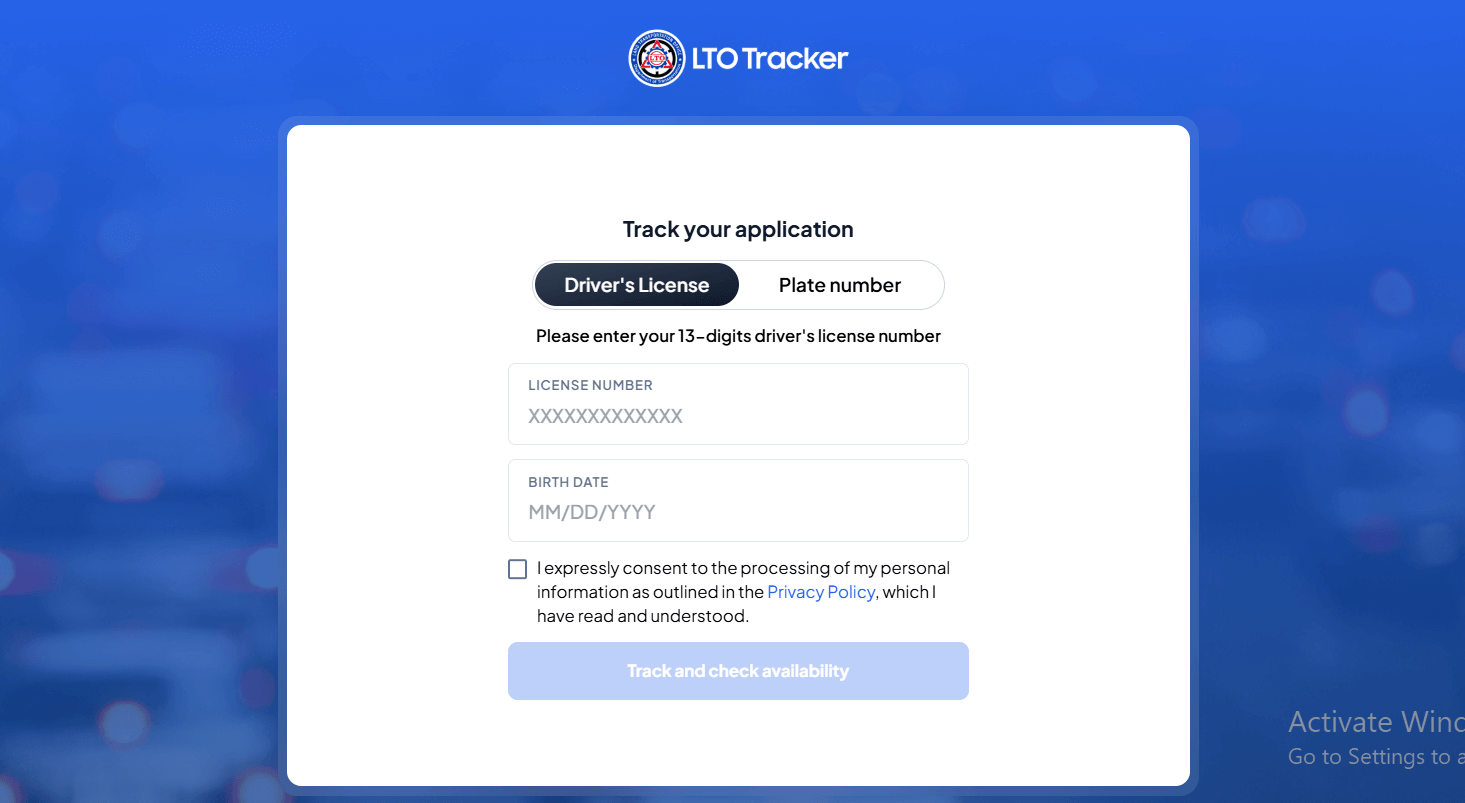
The LTO Tracker is an online tool provided by the Land Transportation Office that allows drivers to check the status of their license plates and driver’s licenses in real time without visiting an office.
The Land Transportation Office (LTO) in the Philippines continues to improve its online services, making it easier for vehicle owners to track the status of their license plates. Whether you’re trying to monitor the release of your motorcycle plate, check your car’s assigned number, or confirm plate information, the LTO tracker and online verification tools provide a fast and reliable way to stay updated.
Many people search for terms like LTO plate number tracker, LTO plate number check owner, and LTO plate number check online, especially when their plates are delayed or still in the manufacturing process. This guide explains everything you need to know in simple steps.
Table of Contents
LTO Plate Number Tracker
The LTO Plate Number Tracker is an online tool that allows vehicle owners to check the status of their license plates. It is designed to help you:
This tool supports checking plate numbers for:
How to Use the LTO Plate Number Tracker Online
To check your plate status, follow these steps:
- Go to the official LTO Plate Verification Page.
- Enter your plate number or conduction sticker if the plate is not yet issued.
- Click on the Check Status button.
- View the results showing your plate’s availability, release date, and assigned LTO location.
This online tool makes it convenient for anyone to perform an LTO plate number check online without going to an office.
Check the Owner of an LTO Plate Number?
Many users try to perform an LTO plate number check owner, hoping to get information about the registered owner of a vehicle.
However, due to the Data Privacy Act of the Philippines, personal information such as name, address, or contact details of vehicle owners is not publicly accessible.
Here’s what you can check:
- Vehicle classification
- Plate status
- Plate release details
- Assigned LTO district office
If you have a legal or emergency case (e.g., accident, crime), you may request owner information through:
- LTO official records request
- Police report
- Insurance company investigation
For regular inquiries, only non-personal vehicle information is allowed.
How Dealers Help with Plate Number Tracking
Your dealership also plays a role in the plate release process. If your plate is delayed, you can give them your:
- MV File Number
- Serial number
- Conduction sticker
They can directly inquiry with LTO and confirm whether your plate is ready for pick-up or still pending.
LTO Plate Release: How to Claim Your Plate
Once your LTO tracker result shows “Ready for Release,” follow these steps:
- Visit the indicated LTO district office
- Bring the required documents:
- OR/CR
- Valid ID
- Temporary plate or conduction sticker
- Proceed to the Plate Releasing Section
- Receive your plate and attach it properly
Motorcycle owners must install a plate lock for security.
Finding Your Plate Number Through the LTMS Portal
If your vehicle is new and you still do not know your assigned plate number, you can check it using the LTMS (LTO Portal):
- Visit portal.lto.gov.ph
- Log in to your LTMS account
- Go to Motor Vehicle Registration
- Choose your vehicle
- Check the assigned plate number (if already generated)
This is one of the most accurate ways to verify pending plates.
Why LTO Online Plate Tracking Is Important
Using online tools like the LTO plate number tracker helps vehicle owners track the process without dealing with long lines or misinformation. It promotes convenience, transparency, and accuracy in the distribution of license plates.
Whether you are checking status, tracking release, or confirming your assigned number, online LTO services make the process significantly easier.
How to Verify Your LTO Plate Number Online
The checked and most updated method to verify your plate number is through the official LTO Plate Verification Portal.
Step-by-Step Guide
- Visit the official page:
👉 LTO Plate Number Verification
(based on your provided reference) - Enter your Plate Number
Example: “ABC1234” or “1234AB” - Click Check Status
The system will show:- Plate availability
- Release status
- Assigned vehicle type
- Location where plate will be released
- If your plate is ready, note the LTO Office where you can claim it.
How Do I Find My License Plate Number Online?
If you still don’t have your physical plate number after buying a vehicle, you can check the status using:
✔ LTO Portal (LTMS)
- Go to LTMS Portal
- Sign in to your account
- Go to Motor Vehicle Transactions
- Select your vehicle
- Check the details, including:
- CR number
- OR number
- Assigned plate number (if already generated)
✔ Dealer Inquiry
If LTO has not yet assigned the plate:
- Contact the dealer
- Provide your MV File Number
- Dealers can check plate assignment status directly with LTO
How to Claim Your LTO Plate Number
Once the portal shows that your plate is ready for release, follow these steps:
Requirements to Bring
- Original OR/CR
- Valid ID
- Temporary Plate / Conduction Sticker
- Authorization letter if someone else claims it
Steps
- Visit the LTO branch indicated in the verification result
- Go to the Plate Releasing Section
- Submit your documents
- Claim your plate
- Attach the plate using proper screws and plate lock (motorcycles)
How to Register Your Vehicle with LTO (New & Late Registration)
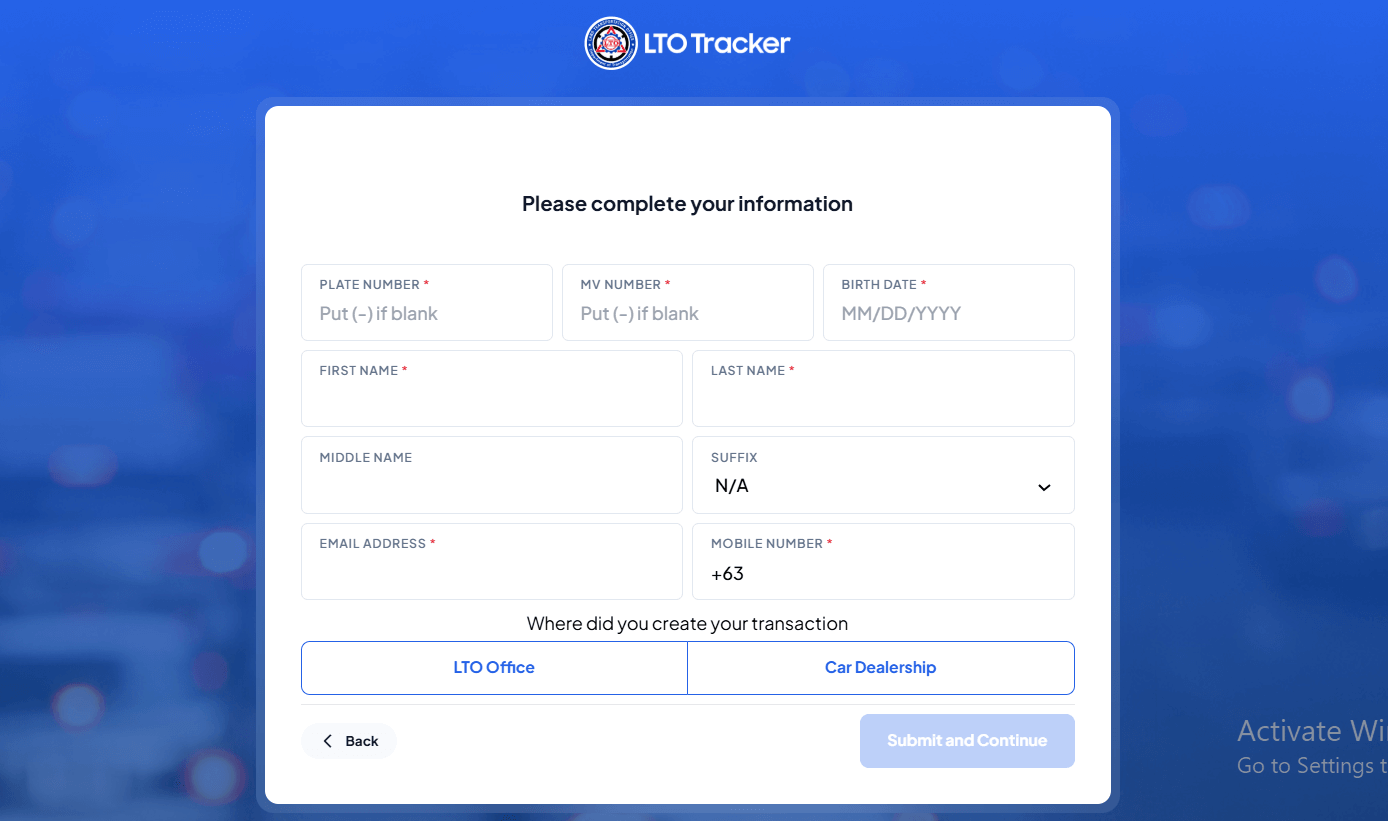
Whether it’s a brand-new vehicle or a renewal, the LTO registration process is now more organized.
✔ New Vehicle Registration
This is normally handled by the dealership, but the process includes:
- Submission of sales invoice
- PNP-HPG Clearance
- Insurance (CTPL)
- Actual vehicle inspection
- MVIR issuance
- Payment of registration fees
Once processed, LTO assigns a plate number.
✔ Motorcycle or Car Registration Renewal (LTMS Portal)
- Visit portal.lto.gov.ph
- Log in to LTMS
- Go to Motor Vehicle Registration
- Review your details
- Pay online
- Go for inspection if required
Can You Check the Owner by Plate Number?
Many people search for ways to check the owner of a vehicle using a plate number.
However:
❗ LTO does NOT allow public access to personal owner details due to privacy laws (Data Privacy Act).
You can only access owner information through:
- LTO records request (with legal basis)
- Police report (for accidents or crime)
- Insurance companies during claims
For personal use, LTO only allows verification of:
- Vehicle model
- Type
- Plate status
- Plate release location
Other Ways to Track Your LTO Plate Number
✔ Text Hotline
Hotlines sometimes assist with plate inquiries, depending on region.
✔ Official LTO Facebook Page
Many district offices post plate release announcements.
✔ Dealer Tracking
Your dealership usually receives the plates before owners.
📦 Plate Delivery Option (Home Delivery Info)
Add:
• Upload ID + OR/CR
• Enter address
• Pay courier fee
• Get SMS tracking
• Delivery 3–10 days
💰 Delivery Fees Table
| Location | Estimated Fee |
|---|---|
| Metro Manila | ₱150–₱250 |
| Nearby cities | ₱250–₱400 |
| Remote areas | ₱400–₱600 |
🟢 Status Meanings
| Status | Meaning |
|---|---|
| In Process | Being manufactured |
| Dispatched | Sent to branch |
| Ready for Pickup | Collect at branch |
| Out for Delivery | Courier on the way |
Final Thoughts
The process of tracking and verifying your LTO plate number is much easier today thanks to online tools like the LTO Plate Number Verification Portal and LTMS. Whether you’re checking plate availability, claiming your plate, or registering a new vehicle, this guide covers everything you need to stay updated and compliant.
Frequently Asked Questions About LTO Plate Tracking
You can check your plate number status using the official Land Transportation Office (LTO) online tools.
Steps:
Visit the LTO Portal or Plate Tracker page
Enter your plate number or MV file number
Click Search / Track
View the current status (Processing, Dispatched, Ready for Pickup, or Delivered)
You don’t need to visit a branch just to check availability.
👉 Tip: Use your MV file number if your plate hasn’t been assigned yet.
Plate release time depends on production and delivery schedules.
Average timeline:
• New vehicles: 1–3 months
• Delayed/backlog plates: 3–6 months
• Delivery to home: 3–10 business days after dispatch
If your status shows “Ready for Pickup”, you can claim it immediately at the assigned branch.
Yes, you can.
Most plate tracking tools do not require an LTMS account.
You only need:
• Plate number
OR
• 15-digit MV file number
Just enter the number and check instantly.
However, logging into your LTMS account may show more detailed vehicle records.
Delivery fees depend on your location.
Estimated fees:
• Metro Manila: ₱150–₱250
• Nearby provinces: ₱250–₱400
• Remote areas: ₱400–₱600
Payments are usually made through:
• GCash
• QRPh
• Online payment gateways
Delivery is often cheaper than multiple trips to an LTO office.
If the system says “Not Found”, don’t panic.
Common reasons:
• Plate still being processed
• Number entered incorrectly
• System not updated yet
• New registration not encoded
Fix:
• Double-check your plate/MV number
• Try again after 24–48 hours
• Use your LTMS client number
• Contact your dealer or LTO branch
Most cases update automatically after processing.
Yes. Different countries provide their own online registration portals.
For example, Queensland drivers in Australia can check rego details using a rego check service here → https://qldcheckrego.com/




-
 Online Services6 years ago
SimpleNote Reviews, Features and Pricing
-

 Gaming4 months ago
Download Prod keys Ryujinx & Yuzu latest version Emulator
-
 Technology5 years ago
HOW TO FIND GRAHM AND ROUTE IN FALLOUT 76
-
 Online Services6 years ago
LittleSnitch Network Monitor | Lock down Network Traffic
-
 Online Services6 years ago
FMovies Reviews, Features and Pricing | Online Movies Platform
-
 Technology6 years ago
Avira Phantom VPN for Mac
-
 Online Services6 years ago
Krita Reviews, Features and pricing | Edit photo online free
-
 Gaming3 years ago
Nintendo Switch Firmwares Updates | YUZU & Ryujinx