
Best Note-Taking Apps in 2026: 11 Free and Paid Apps Compared
Updated November 23, 2026. Prices and plan limits come from each app’s own pricing page, checked this month. We are not paid by any of the companies below.
A good note-taking app should make it quick to write something down and easy to find it later. The choice got harder over the last few years: Evernote cut its free plan to 50 notes, Simplenote stopped getting new features, and Obsidian became free even for work. This guide compares 11 note-taking apps, free and paid, so you can choose one you will still be happy with in five years.
Quick answer: Microsoft OneNote is the best completely free note-taking app for most people. Choose Obsidian if you want private notes stored as files on your own device, Notion if your notes double as projects and team docs, Apple Notes or Bear if you only use Apple devices, and Joplin for a free, open-source Evernote alternative. Avoid starting fresh on Evernote’s free plan: it is capped at 50 notes.
Table of Contents
What changed in note-taking apps
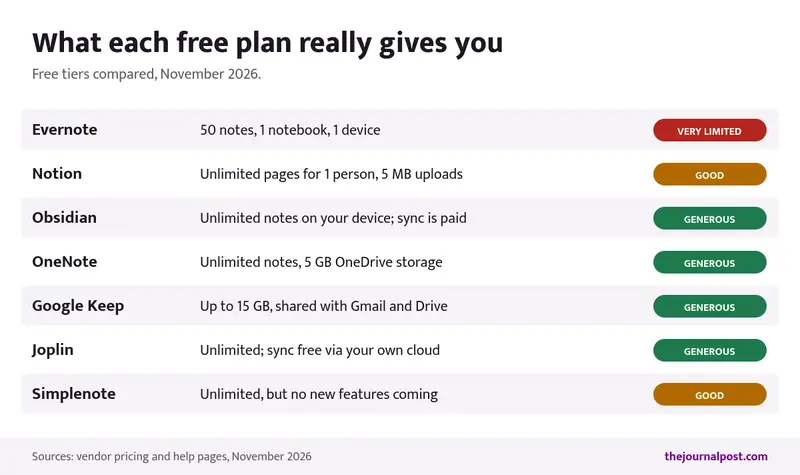
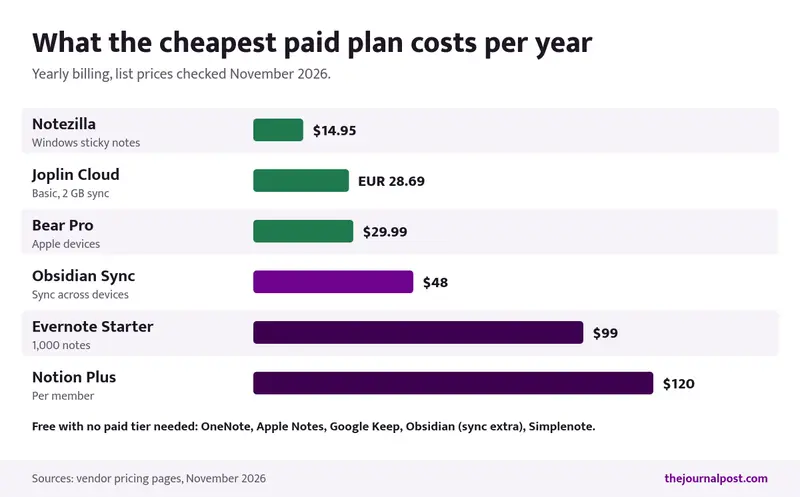
- Evernote’s free plan is now very limited. Since December 4, 2023, free accounts get 50 notes, one notebook and one device. In late 2025 Evernote renamed its paid plans to Starter ($99 a year) and Advanced ($249.99 a year).
- Obsidian is free for work. Since February 20, 2025, the commercial license is optional, so anyone can use Obsidian at work without paying.
- Simplenote is in maintenance mode. On March 2, 2026, Automattic said active development has ended; the app stays free and working, but no new features are planned.
- OneNote for Windows 10 has been retired in favor of the single OneNote app for Windows, which is still free.
- Laverna, an old open-source favorite, has been abandoned.
Best note-taking apps at a glance
| App | Free plan | Paid from | Platforms | Best for |
|---|---|---|---|---|
| OneNote | Yes, full app | Optional Microsoft 365 for more storage | Windows, Mac, iOS, Android, web | Best free all-rounder |
| Obsidian | Yes, all features | Sync $4/month (yearly) | Windows, Mac, Linux, iOS, Android | Private, file-based notes |
| Notion | Yes, for individuals | Plus $10/member/month (yearly) | Windows, Mac, iOS, Android, web | Notes plus projects |
| Apple Notes | Yes | iCloud+ for more storage | iPhone, iPad, Mac, iCloud.com | Apple users |
| Google Keep | Yes | Google One for more storage | Android, iOS, web | Quick notes and lists |
| Joplin | Yes, open source | Joplin Cloud EUR 2.40/month (yearly) | Windows, Mac, Linux, iOS, Android | Open-source Evernote alternative |
| Evernote | 50 notes, 1 notebook | Starter $99/year | Windows, Mac, iOS, Android, web | Web clipping and search |
| Bear | Yes, no sync | Pro $29.99/year | iPhone, iPad, Mac | Writing on Apple devices |
| Simplenote | Yes, fully free | None | Windows, Mac, Linux, iOS, Android, web | Plain, simple notes |
| Notezilla | Trial | From $14.95/year | Windows, plus mobile apps | Desktop sticky notes |
| RedNotebook | Yes, open source | None | Windows, Mac, Linux | Private desktop journal |
The 11 note-taking apps compared
1. Microsoft OneNote: best free note-taking app
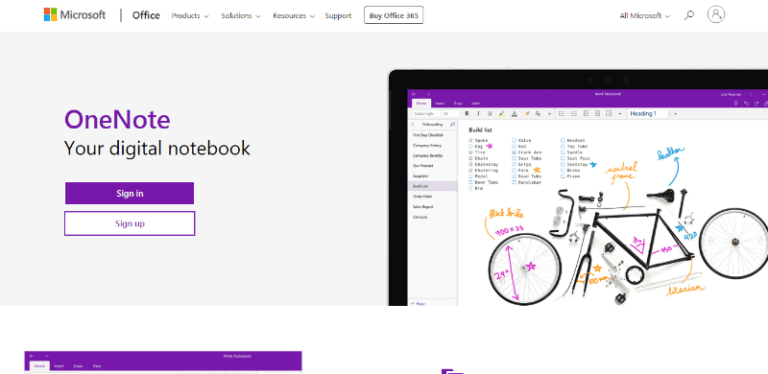
OneNote is free on Windows, Mac, iPhone, iPad, Android and the web. It works like a digital binder: notebooks hold sections, and sections hold free-form pages where you can type anywhere, draw, record audio, clip web pages and paste images. Notes sync through OneDrive, which includes 5 GB of free storage; a Microsoft 365 subscription adds much more. It also offers handwriting and text search in images at no cost.
- Good: completely free, very flexible pages, great for students
- Watch out: free storage is 5 GB, layout can feel cluttered
2. Obsidian: best for private notes you own
Obsidian stores your notes as plain Markdown files in a folder on your own device, so nothing is locked into a company’s servers. You can link notes together, see them on a graph and add hundreds of community plugins. The full app is free for personal and work use. You only pay if you want Obsidian’s own Sync service ($4 a month on yearly billing) or Publish ($8 a month on yearly billing); you can also sync for free using a cloud folder you already have.
- Good: free, private, future-proof files, huge plugin library
- Watch out: takes time to set up, sync costs extra
3. Notion: best when notes turn into projects
Notion combines notes, documents, databases and task boards in one workspace, which makes it popular with students, freelancers and small teams. The Free plan works well for one person, though file uploads are limited to 5 MB and page history to 7 days. Plus costs $10 per member per month on yearly billing, and full Notion AI requires the Business plan at $20 per member per month.
- Good: very flexible, great templates, strong for teams
- Watch out: can feel slow and heavy for quick notes, AI costs extra
4. Apple Notes: best free choice for Apple users
Apple Notes comes free on every iPhone, iPad and Mac and syncs through iCloud, with web access at iCloud.com. It supports checklists, tables, scanned documents, drawings, tags, smart folders and locked notes. It uses your iCloud storage, and Apple’s free tier is 5 GB, so heavy users may need iCloud+. There is no native Windows or Android app.
- Good: free, fast, built into every Apple device
- Watch out: Apple-only apps, uses limited iCloud storage
5. Google Keep: best for quick notes and lists
Google Keep is a free, sticky-note style app for quick ideas, shopping lists, reminders and voice notes. It works on Android, iPhone and the web and connects with Google Docs and Gmail. Notes count against your Google account storage, which is up to 15 GB shared with Gmail, Drive and Photos. It is not built for long documents or deep organization.
- Good: free, very fast, great on Android
- Watch out: basic formatting, not for big note collections
6. Joplin: best open-source Evernote alternative
Joplin is a free, open-source app for Windows, Mac, Linux, iPhone and Android with notebooks, tags, a web clipper and end-to-end encryption. It can import Evernote exports and sync for free through Dropbox, OneDrive, Nextcloud or your own server. Joplin Cloud, its paid sync service, starts at EUR 2.40 a month on yearly billing (EUR 2.99 monthly) for 2 GB, with Pro at EUR 4.79 a month (yearly) for 30 GB.
- Good: free, encrypted, imports Evernote notes
- Watch out: plainer design, Joplin Cloud is priced in euros
7. Evernote: strong features, weak free plan
Evernote still has excellent search, including text inside images and PDFs, plus a great web clipper. But its free plan is now limited to 50 notes, one notebook and one device. Starter costs $99 a year for 1,000 notes and 20 notebooks, and Advanced is $249.99 a year with unlimited notes. Existing free users above the limit can still view, edit and export their notes, but cannot add more without upgrading.
- Good: powerful search and web clipping
- Watch out: very limited free plan, expensive paid plans
8. Bear: best writing app for iPhone, iPad and Mac
Bear is a beautiful Markdown note app for Apple devices with tags, themes and focused writing tools. The free version works on one device; Bear Pro adds iCloud sync, note encryption, more export formats and text search inside images and PDFs for $2.99 a month or $29.99 a year. It has no Windows, Android or full web app.
- Good: beautiful design, great for writers, low price
- Watch out: Apple-only, sync requires Pro
9. Simplenote: simple and free, but not evolving
Simplenote from Automattic is a clean, fast plain-text note app that syncs across Windows, Mac, Linux, iPhone, Android and the web, all for free. In March 2026 Automattic said active development has ended and only basic maintenance will continue. It still works well for simple notes, but do not expect new features.
- Good: completely free, fast, works everywhere
- Watch out: no new features planned, plain text only
10. Notezilla: sticky notes for the Windows desktop
Notezilla puts colorful sticky notes on your Windows desktop and lets you attach them to documents, folders and websites. Free iPhone, iPad and Android apps sync your notes when you use its optional cloud sync. It is paid software, with plans from $14.95 a year after a free trial.
- Good: great desktop sticky notes, attach notes to files
- Watch out: paid only, mainly for Windows users
11. RedNotebook: free private journal for your desktop
RedNotebook is a free, open-source diary and journal app for Windows, Mac and Linux. Entries are organized by date in a calendar, stored on your own computer, and can be tagged, searched and exported. It suits people who want a private daily journal rather than a synced note system.
- Good: free, private, simple calendar journal
- Watch out: desktop only, no built-in cloud sync
Which note-taking app should you choose?
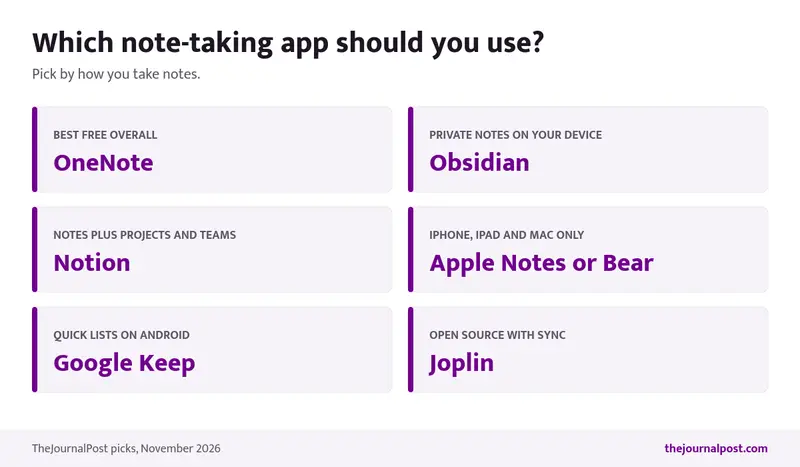
- Students: OneNote for free-form class notes, or Notion if you also plan assignments.
- Writers and researchers: Obsidian for linked notes, or Bear on Apple devices.
- Small teams: Notion for shared docs and tasks.
- Quick lists and reminders: Google Keep or Apple Notes.
- Privacy first: Obsidian with local files, or Joplin with end-to-end encryption.
- Desktop sticky notes on Windows: Notezilla.
How to move your notes out of Evernote
If Evernote’s 50-note limit is a problem, you can switch without losing anything. In the Evernote desktop app, export each notebook as an ENEX file. Joplin imports ENEX files directly, Obsidian can import them with its official Importer plugin, and Notion has a built-in Evernote import. Check a few notes after importing, especially ones with attachments, before you delete anything from Evernote.
What happened to the other apps we reviewed?
Our earlier reviews also covered myDiary, Chrysanth Diary, CintaNotes, WizNote and Laverna. Laverna has been abandoned by its developers and should not be used for new notes. The others are smaller or region-specific apps; for most readers, the 11 apps above are better supported and easier to recommend. If you already use one of them, check the developer’s site for current versions and export your notes regularly.
How we compared these apps
We compared free plans, paid prices, platforms, sync options and export features using each app’s official pricing and help pages, checked in November 2026, and cross-checked major changes such as Evernote’s plan changes and Simplenote’s maintenance status against news coverage. Prices are list prices and may differ by country, tax and promotions.
Frequently asked questions
Microsoft OneNote is the best completely free note-taking app for most people, with apps on every major platform and 5 GB of free OneDrive storage. Obsidian is the best free choice if you want private notes stored on your own device.
Evernote still has a free plan, but it is limited to 50 notes, one notebook and one device. Paid plans start at $99 a year for Starter.
Yes. Since February 2025, Obsidian is free for personal and commercial use. You only pay for optional services like Obsidian Sync or Publish.
Notion is free for individuals. The Plus plan costs $10 per member per month on yearly billing, and the Business plan, which includes full Notion AI, costs $20 per member per month.
No. Simplenote still works and is free, but Automattic announced in March 2026 that active development has ended and only basic maintenance will continue.
Joplin is the closest free alternative because it uses notebooks and tags, imports Evernote files and offers encrypted sync. OneNote and Obsidian are also good free options.
Apple Notes is the best free choice on iPhone. Bear is a great paid option for writers at $29.99 a year, and OneNote and Obsidian work well if you also use Windows or Android.
Sources
- Evernote compare-plans page and Engadget/TechCrunch coverage of the free-plan limits
- Obsidian pricing page and “Obsidian is now free for work” announcement (February 20, 2025)
- Notion pricing page
- Joplin Cloud plans page
- Bear Pro features and price (bear.app)
- AlternativeTo and Automattic notice on Simplenote maintenance (March 2, 2026)
- Microsoft Support on OneNote for Windows 10 retirement
- Conceptworld Notezilla pricing
- Laverna GitHub repository
Prices and limits change often. Confirm on the app’s official site before you pay.



3 Comments